Player Log
Records per-player activity across games and exposes it in the plugin page of the admin panel, making it possible to audit behaviour days after the fact.
Plugin ID: gg.empostor.playerlog · Data file: Data/PlayerLogData.json
This is a standalone plugin, not built into Empostor. Without it installed there is no player log entry anywhere in the admin panel; install the .dll, restart, and Player Log appears under Plugins in the sidebar.
| Reference | Where |
|---|---|
| Configuration | None |
| Commands | None |
| Admin Panel | Plugin page Player Log (see Using the Admin Panel) |
| HTTP API | GET /player-log/export (requires the admin session cookie) |
Unlike the in-memory admin views, this plugin persists a rolling history to disk, so it survives a server restart.
Recorded Events
Each entry carries one of the following Type values:
| Type | Triggered when |
|---|---|
Connect | A client connects to the server. |
Join | A player joins a game. |
Leave | A player leaves a game. |
Chat | A player sends a chat message. |
Game | A game is created, started, or ended. |
Task | A player completes a task. |
Murder | A player is killed. |
Report | A body is reported. |
Meeting | A meeting starts or ends. |
Vent | A player enters or exits a vent. |
Vote | A player casts a vote. |
Exile | A player is voted out. |
Every entry stores the same set of fields:
| Field | Description |
|---|---|
Time | UTC timestamp of the event. |
Type | One of the types listed above. |
ClientId | Numeric client ID, when applicable. |
PlayerName | In-game name at the time of the event. |
FriendCode | Friend code, when known. |
GameCode | Room code of the game in progress. |
Detail | Human-readable description of what happened. |
Using the Admin Panel
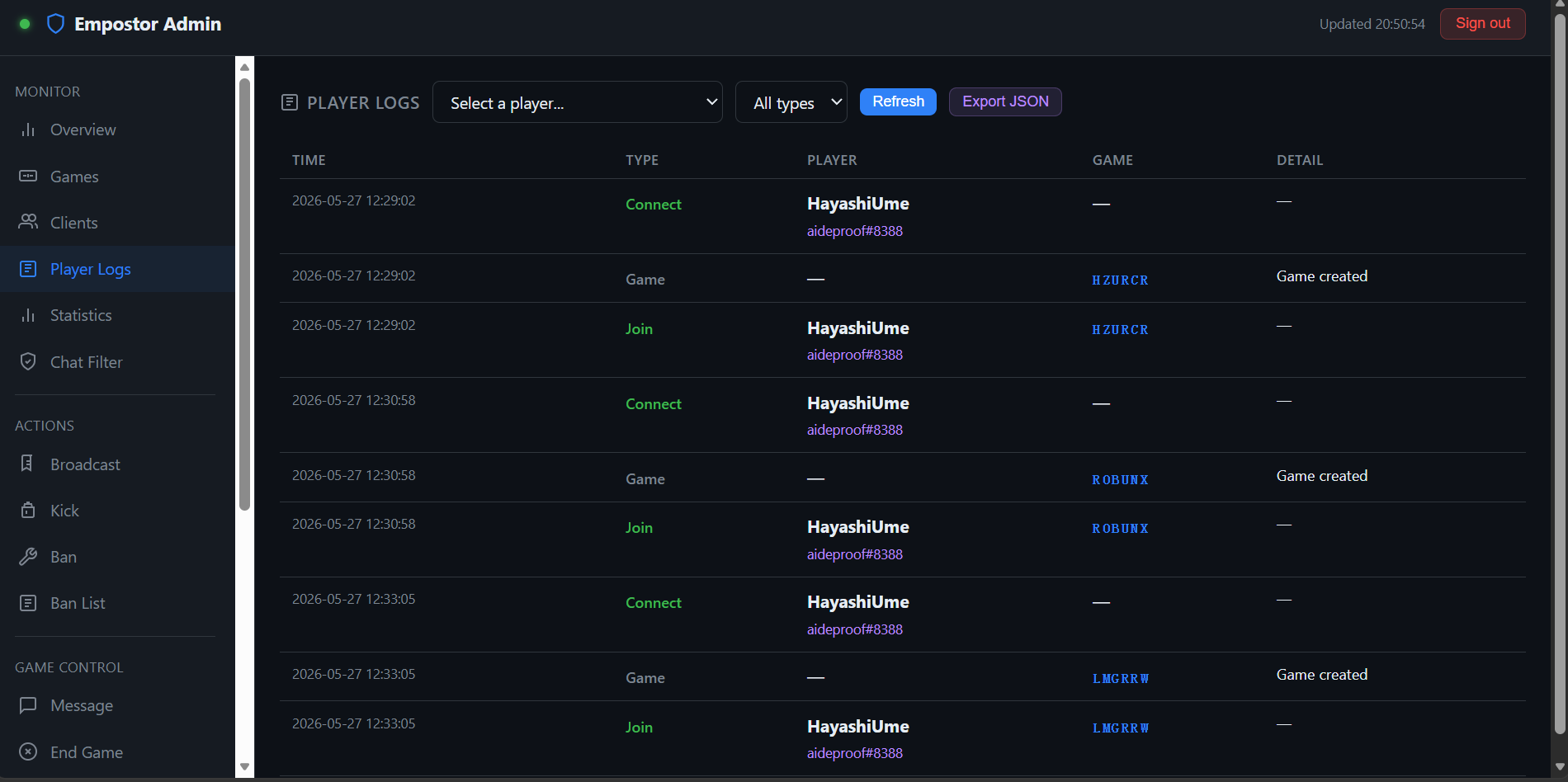
Open the Player Log plugin page under Plugins in the Admin Panel sidebar to:
- Filter with the Player dropdown —
All players, or a specific#ID Name (FriendCode). - Move through pages with the Page dropdown, 100 entries per page.
- Click Export as JSON for the payload size, then open
/player-log/exportto download it (the admin session cookie is required; add?clientId=123for a single player). - Pick a range in the Clear logs dropdown (all / 1 hour / 24 hours / 7 days / 30 days) and click Clear Logs.
Exports work for a single player as well as for the whole log, which is useful when handing evidence to another operator.
Storage & Retention
The log is capped at 10,000 entries. Once the cap is exceeded the oldest entry is dropped for each new one written, so the file size stays bounded.
Data is written back asynchronously after every write and is loaded from disk on server start:
| Aspect | Value |
|---|---|
| Path | Data/PlayerLogData.json (a legacy Data/player_logs.json is migrated automatically) |
| Format | JSON array of entry objects |
| Max entries | 10,000 (oldest discarded first) |
| Persistence | Survives restarts |
Scale
On a busy server 10,000 entries can be reached in a single day. If you need long-term retention, schedule an export and clear the log periodically.
Privacy
Player logs can contain personally identifying information such as IP addresses and friend codes. Store exports responsibly and check your Privacy Policy page if your server processes personal data.
Related
- Monitor — expose health-check endpoints for external uptime tools.
- Player Stats — aggregate per-player outcomes rather than raw events.
- Reports — in-game reports submitted by players.